


Często zadawane pytania - kategoria
SELECT LOCATION AND LANGUAGE
GLOBAL
AMERICAS
-
BELGIUM
FRANÇAIS
-
BELGIUM
NEDERLANDS
-
NETHERLANDS
NEDERLANDS
-
SWITZERLAND
DEUTSCH
-
SWITZERLAND
FRANÇAIS
-
SWITZERLAND
ITALIANO
-
AUSTRIA
DEUTSCH
-
FRANCE
FRANÇAIS
-
GERMANY
DEUTSCH
-
ITALY
ITALIANO
-
SPAIN
ESPAÑOL
-
PORTUGAL
PORTUGUÊS
-
POLAND
POLSKI
-
UNITED KINGDOM
ENGLISH
-
SWEDEN
SVENSKA
-
DENMARK
DANSK
-
NORWAY
NORSK
-
FINLAND
SUOMI
EUROPE
ASIA
OCEANIA
Przepraszamy, brak rezultatów.
Prosimy spróbować ponownie, wpisując inne słowo.
SHIMANO CONNECT
SHIMANO ID
What is SHIMANO ID? (SC-1050)
"SHIMANO ID" is a shared account used to access SHIMANO's bike-related apps (SHIMANO CONNECT, E-TUBE PROJECT Cyclist, and E-TUBE RIDE).
See below for the features available with your SHIMANO ID.
Is signing up or logging in to SHIMANO ID required? (SC-1700)
It is not required, but signing up or logging in to SHIMANO ID allows you to use the following features:
- Automatic bike connection
- Customization of assist settings
etc.
*These features are not available if you do not log in.
Additionally, SHIMANO E-BIKE SYSTEMS allows only one user to be registered per bike.
If you do not log in with your SHIMANO ID and register your bike, someone else could register it as theirs.
To ensure your peace of mind while using your bike, please log in with your SHIMANO ID and register your bike.
I cannot sign up or log in to SHIMANO ID. (SC-1060)
If you cannot sign up or log in to SHIMANO ID, check the following:
- Internet connection
An internet connection is required to sign up or log in to SHIMANO ID.
Check your internet connection to ensure that Wi-Fi or cellular data is enabled.
- Email address and password
Check that the email address or password you entered is correct.
If you have forgotten your password, tap "Forgot password?" and enter the email address registered to your SHIMANO ID, then reset your password.
- Supported regions
SHIMANO ID is available only in supported regions.
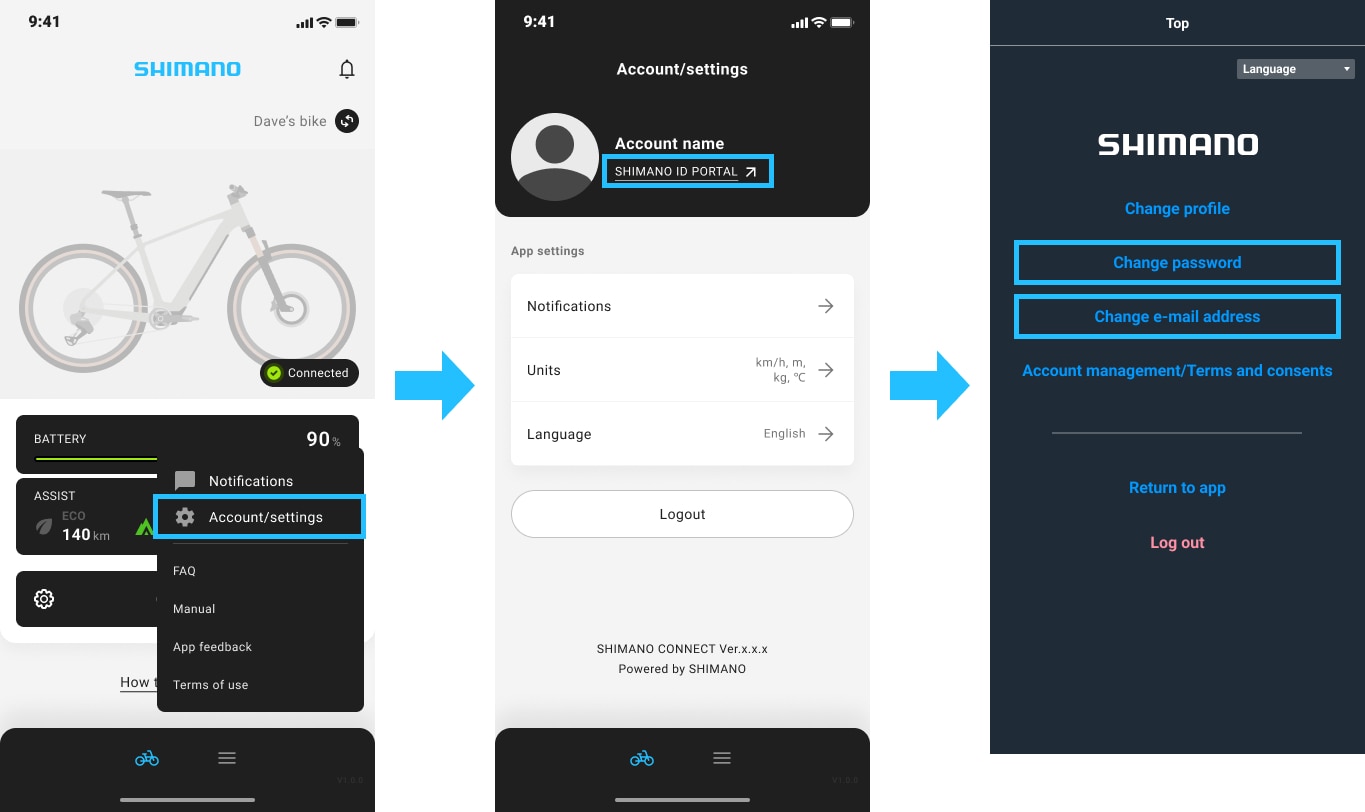
How do I change my SHIMANO ID email address or password? (SC-1070)
Follow the steps below to change your SHIMANO ID email address or password.
- Open SHIMANO CONNECT and log in.
- Go to "Account/settings" and open SHIMANO ID PORTAL.
- On the screen displayed, change your email address or password.
How do I log out of SHIMANO ID? (SC-1080)
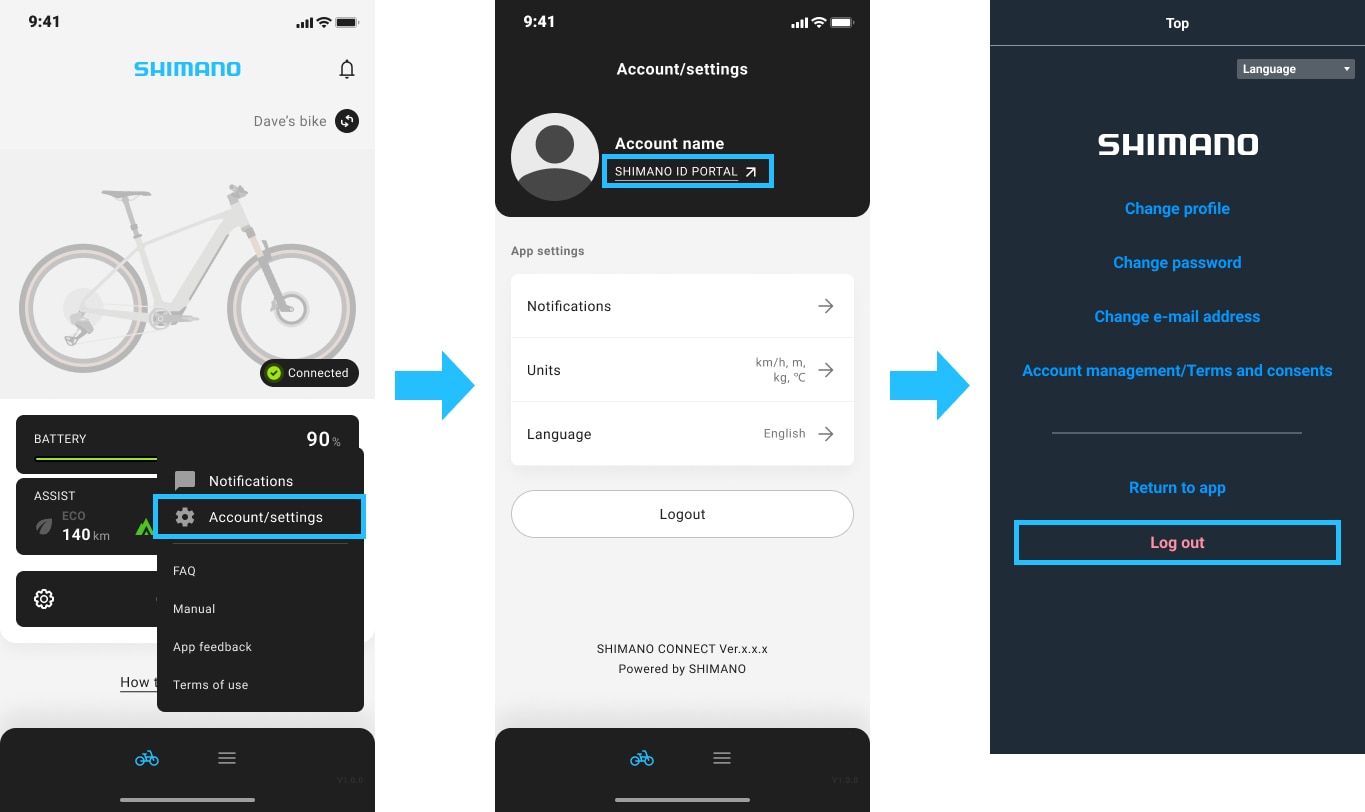
Follow the steps below to log out of SHIMANO ID.
- Open SHIMANO CONNECT.
- Go to "Account/settings" and open SHIMANO ID PORTAL.
- On the screen displayed, log out of SHIMANO ID.
How do I delete my SHIMANO ID? (SC-1090)
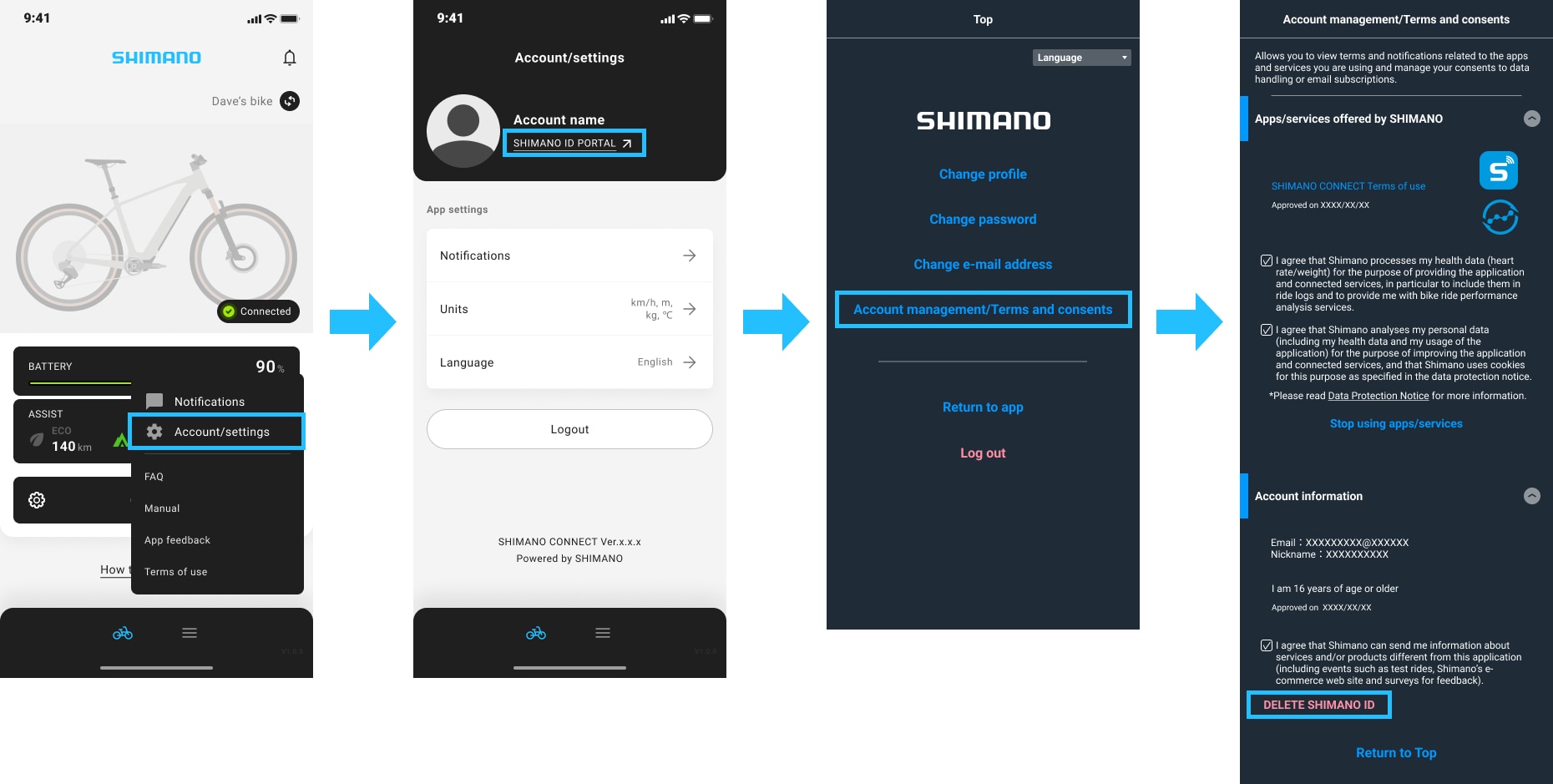
Follow the steps below to delete your SHIMANO ID.
*Once deleted, all data linked to your SHIMANO ID such as bike information and ride history will be permanently deleted and cannot be restored.
- Open SHIMANO CONNECT and log in.
- Go to "Account/settings" and open SHIMANO ID PORTAL.
- Select "Account management/Terms and consents" > "Account information".
- Tap "Delete SHIMANO ID" and follow the instructions on the screen to delete your SHIMANO ID.
Where can I use my SHIMANO ID? (R-5030)
Tap here for countries where SHIMANO ID is available.
SHIMANO CONNECT
Bike registration
I cannot pair my bike with SHIMANO CONNECT. (SC-1020)
If you cannot pair your bike with SHIMANO CONNECT, follow steps 1 through 5 below.
*Try connecting in an environment with minimal radio wave interference from wireless devices.
1. Update the app to the latest version.
2. Check the configuration and compatibility of your bike.
Check that the components installed on your bike are included in the list of SHIMANO CONNECT-compatible parts.
3. Check the condition of your bike.
-
- Ensure that your bike is turned on.
- Ensure that the bike battery is sufficiently charged.
4. If an error appears while connecting to SHIMANO CONNECT, see below:
-
- When "Incompatible bike detected" appears, see below and take appropriate action.
> "Incompatible bike detected" appears and my bike fails to connect to SHIMANO CONNECT.
-
- When "This bike is already linked to a different SHIMANO ID account." or "The bike is locked." appears, see below and take appropriate action.
> The bike I purchased is already registered and fails to connect to SHIMANO CONNECT.
5. Perform the following operations one by one on your smartphone and check if the bike connects after each operation.
-
- Go to "Settings" on your smartphone and turn off the Bluetooth® setting and then on again. (Restarting the Bluetooth® function)
- Go to "Settings" on your smartphone and open the Bluetooth® screen. Delete the wireless unit, then perform pairing again.
- Reduce the number of devices connected via Bluetooth to 3 or less.
- If your smartphone is set to silent mode, it may fail to pair with your bike. Turn off silent mode.
- Check your smartphone's OS version to see if it is compatible with SHIMANO CONNECT.
The list of supported OS versions can be found on the App Store or Google Play. The app may not function on beta versions of the OS.
For Android
-
-
- Turn on location access, whether you use it or not.
- As the app may not function properly in private space, use it outside of private space.
-
How do I register my bike with SHIMANO CONNECT? (SC-1690)
The bike registration procedure differs between the first bike and any subsequent ones.
- Registering your first bike
Connect to the bike while logged in to your SHIMANO ID, and the bike will be registered automatically.
*If the connection fails, see below:
> I cannot pair my bike with SHIMANO CONNECT.
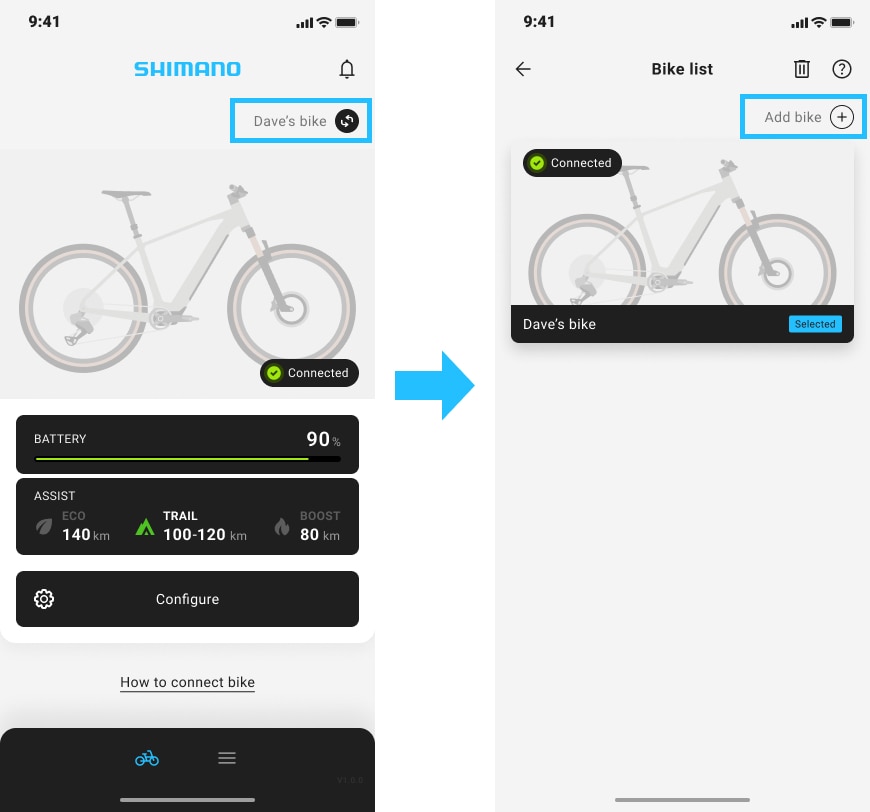
- Registering a second or subsequent bike
Open the "Bike list" screen in SHIMANO CONNECT, tap "Add bike" in the top right corner, then follow the instructions on the screen to register.
*Up to 3 bikes can be registered.
Registering your bike ensures a smoother connection with the app and allows you to use various features. See below for details.
"Incompatible bike detected" appears and my bike fails to connect to SHIMANO CONNECT. (SC-1040)
When "Incompatible bike detected" appears in SHIMANO CONNECT, the combination of components installed on the bike is incompatible.
Check the SHIMANO E-BIKE SYSTEMS compatibility table to see whether the component configuration of your bike is supported, and contact your place of purchase or a distributor.
Can my bike connect to SHIMANO CONNECT? (SC-1100)
Whether it can connect to SHIMANO CONNECT depends on whether the parts installed on your bike are compatible models.
Check the list below for SHIMANO CONNECT-compatible models.
What should I do when location (GPS) permission is required just to use Bluetooth®LE? (NM-4080)
On Android, location access must be turned on to use Bluetooth® LE. Please turn on location access even if you aren’t using this feature on this app.
I cannot connect to a bike registered in SHIMANO CONNECT. (SC-1030)
If you cannot connect to a bike registered in SHIMANO CONNECT, follow the steps below:
1. Check the condition of your bike.
- Ensure that your bike is turned on.
- Ensure that the bike battery is sufficiently charged.
2. Check your smartphone usage status.
When you have replaced your smartphone or are using multiple smartphones, see below:
> Can I use multiple smartphones?
3. When you have replaced bike components
If the connection fails after replacing bike components, see below:
> I cannot figure out how to connect after replacing bike components.
4. Update SHIMANO CONNECT to the latest version.
5. Check your smartphone settings.
Perform the following operations one by one on your smartphone and check if the bike connects after each operation.
- Go to "Settings" on your smartphone and turn off the Bluetooth® setting and then on again. (Restarting the Bluetooth® function)
- Go to "Settings" on your smartphone and open the Bluetooth® screen. Delete the wireless unit, then perform pairing again.
- Reduce the number of devices connected via Bluetooth to 3 or less.
- Turn off silent mode on your smartphone while pairing.
- Check your smartphone's OS version to see if it is compatible with SHIMANO CONNECT.
- The list of supported OS versions can be found on the App Store or Google Play.
- The app may not function properly on beta versions of the OS.
- On Android, turn on location access, whether you use it or not.
- As the app may not function properly in private space on Android, use it outside of private space.
6. Check your network environment.
Try connecting to the bike in an environment with no more than 2 Wi-Fi routers placed nearby. Connection may fail due to radio wave interference.
How do I unregister a bike in SHIMANO CONNECT? (SC-1110)
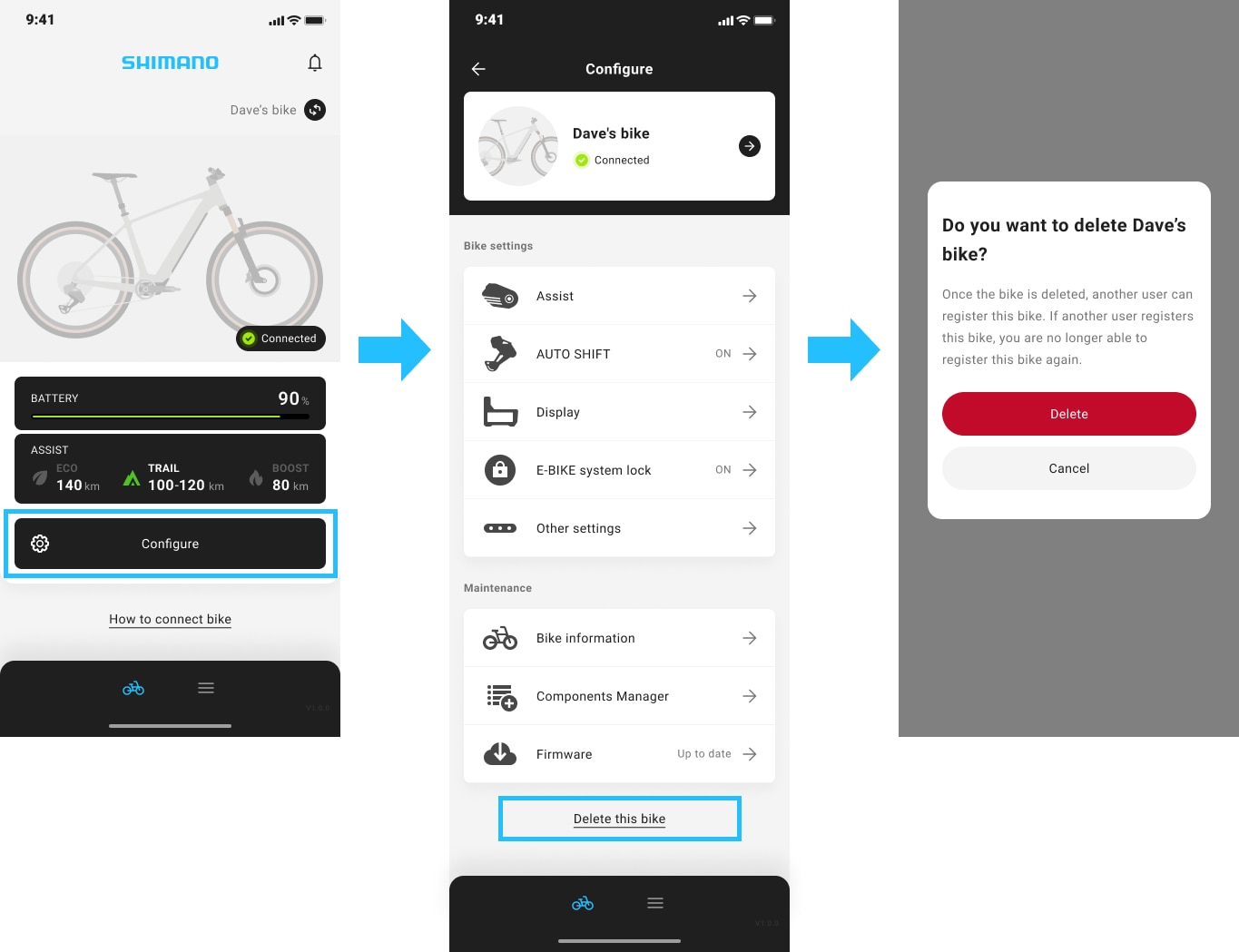
To unregister a bike, open SHIMANO CONNECT and tap "Delete this bike" at the bottom of the "Configure" screen.
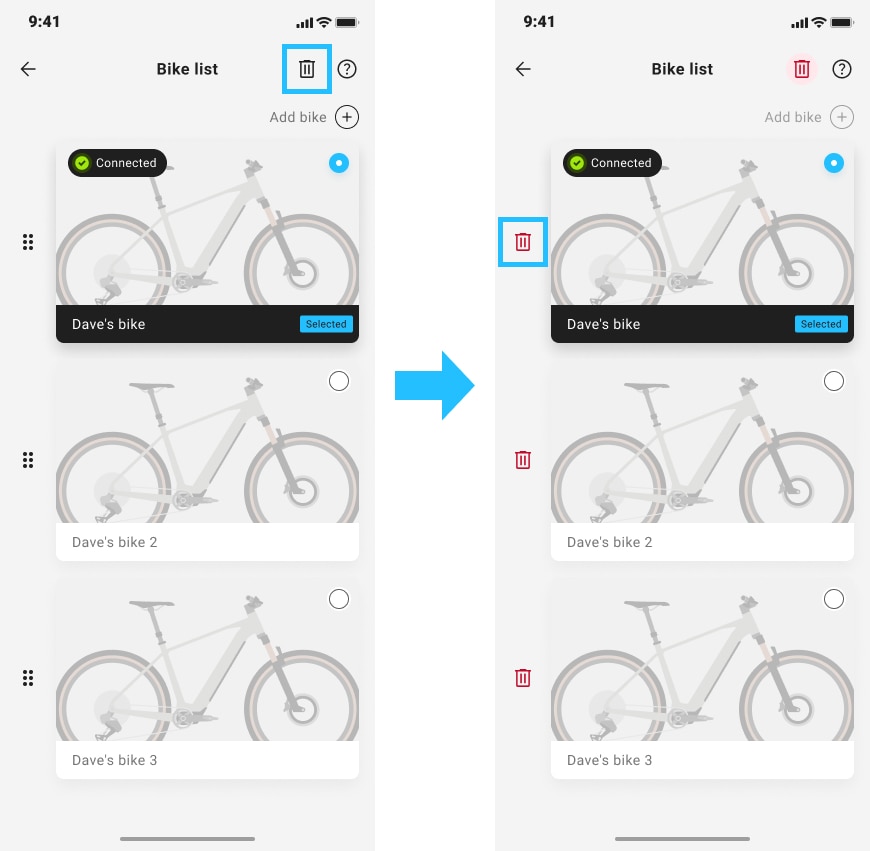
Alternatively, the bike can be deleted from the bike list page.
Do I need to disconnect the bike after using the app? (SC-1120)
Disconnecting the bike in the app is not required, as leaving it connected does not affect its operation.
Turning off the bike disconnects it from the app.
When connecting to a bike other than the one currently connected, see below:
> How do I connect to a different bike using SHIMANO CONNECT?
How do I connect SHIMANO CONNECT to a different bike? (SC-1130)
When you are logged in to SHIMANO ID, you can connect to a different bike by switching to a registered bike or by registering a new bike in the app. Try connecting by following the steps below:
- Switching to a registered bike
- Tap the bike name at the top right of the home screen.
- On the Bike list screen, select the bike you want to connect to.
- If you turn on the bike while the bike you want to connect to is displayed on the home screen, it connects automatically.
- Registering a new bike
- Tap the bike name at the top right of the home screen.
- Select "Add bike" on the Bike list screen.
- Follow the instructions on the screen to add a bike.
When you are not logged in to SHIMANO ID, tap "Configure" > "Delete this bike and connect a different bike" to disconnect from the current bike.
After disconnecting, select "Connect to bike" on the home screen and follow the instructions on the screen to connect to a different bike.
If the connection still fails after trying the steps above, see below:
How do I reconnect the bike after replacing its components? (SC-1140)
If you replace the specific component listed on this page , you cannot reconnect the bike to the app as the original bike. It needs to be registered as a new bike.
To register a new bike, tap the bike name at the top right of the home screen and select "Add bike +" from the Bike list. After completing registration, delete the original bike from the Bike list if necessary.
If any components other than those mentioned above are replaced on a registered bike, the bike automatically connects when you open SHIMANO CONNECT. No configuration or setup is required.
The bike I purchased is already registered by another user and fails to connect to SHIMANO CONNECT. (SC-1150)
If the bike is already registered to another user, proceed as follows:
- If you know who registered the bike
Ask the person who registered the bike to delete the relevant bike information from their SHIMANO CONNECT app.
- If you do not know who registered the bike or the bike is already registered to a third party at the time of purchase
Consult your place of purchase.
- If you are unable to consult your place of purchase
Bring the bike, proof of purchase, and identification documents to a nearby Shimano Service Center (SSC).
The bike will be unregistered once SHIMANO reviews and confirms the details provided by your place of purchase or SSC.
*SHIMANO does not provide support if a third-party E-BIKE system lock is set up. Please contact your place of purchase.
Is there anything I have to do when gifting or selling my bike registered with SHIMANO CONNECT? (SC-1160)
When gifting or selling your bike, be sure to delete the bike. If the bike is not deleted from the app, the new owner will not be able to register the bike.
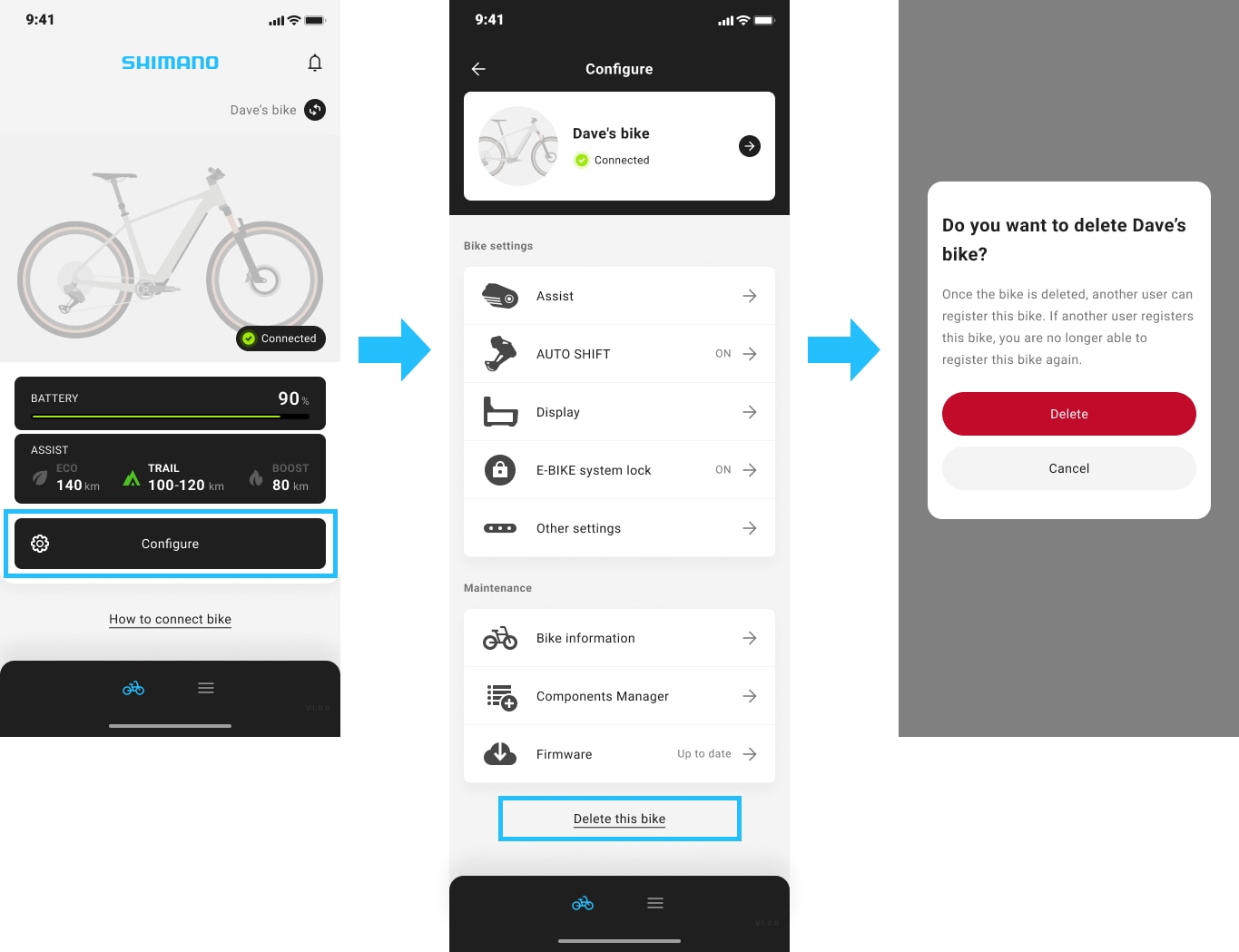
To delete a bike from the app, open SHIMANO CONNECT and tap "Delete this bike" at the bottom of the "Configure" screen.
Can I register multiple bikes with SHIMANO CONNECT? (R-5140)
Yes. You can register multiple bikes with SHIMANO CONNECT.
When you sign up for SHIMANO ID, you can register up to 3 bikes and manage the information for each bike.
You can sign up for SHIMANO ID on the signup screen in the app.
Can I use SHIMANO CONNECT on multiple smartphones? (SC-1170)
Yes, you can log in and use SHIMANO CONNECT on multiple smartphones using the same account.
Registering additional smartphones follows the same procedure as the first.
When a bike is already connected to another smartphone, follow the steps below to switch the connection.
- Open SHIMANO CONNECT on the smartphone you want to connect and display the home screen. Confirm that the bike you want to connect to is displayed.
- Press and hold the assist up button on the bike. Switching is complete once "Connected" appears on the home screen of the app.
SHIMANO CONNECT
App settings
Can I change the language for SHIMANO CONNECT? (SC-1420)
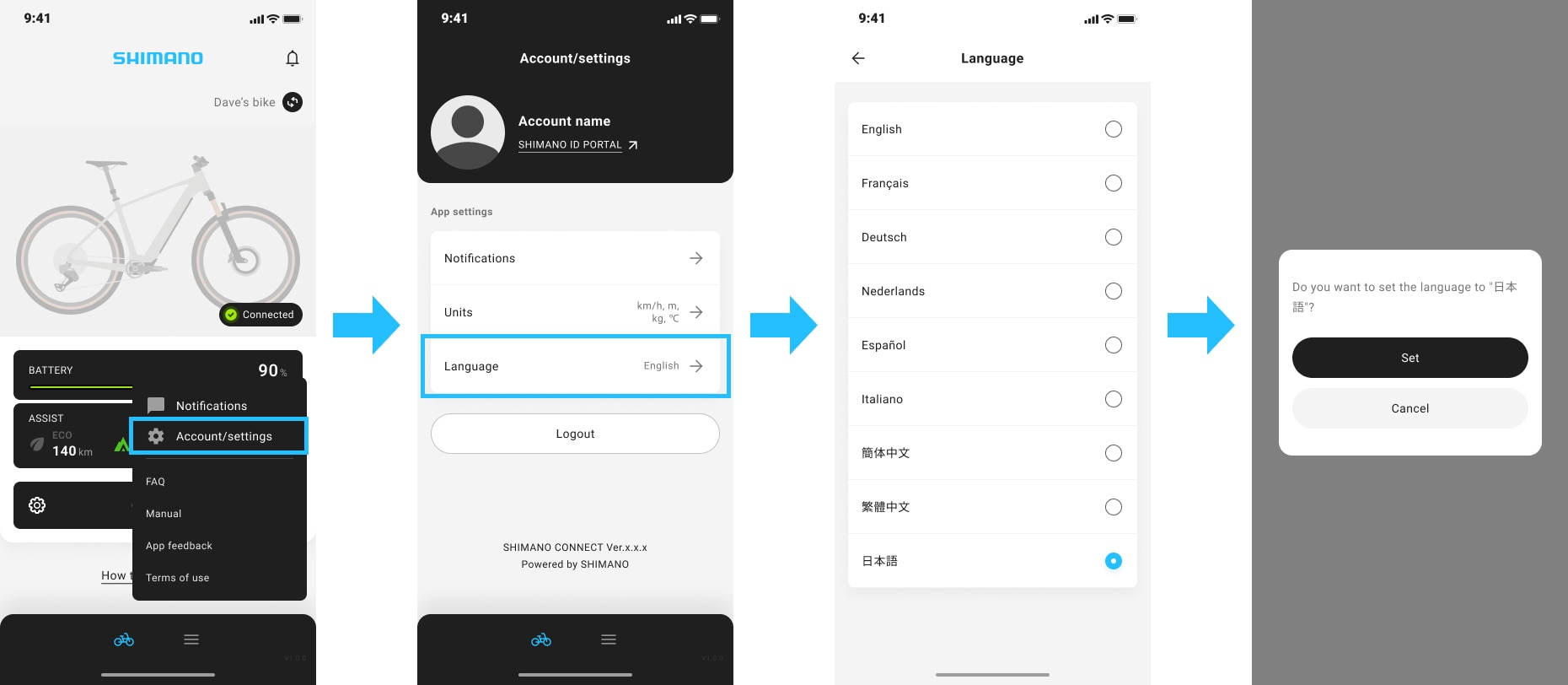
Yes. To change the language setting, go to "Account/settings" at the bottom right of the home screen and select "Language" under App settings. The available languages are as follows:
- English
- French
- German
- Dutch
- Spanish
- Italian
- Simplified Chinese
- Traditional Chinese
- Japanese
I cannot upload my bike image. (NM-2020)
If you cannot upload your bike image, check the following:
- The file format of the bike image must be HEIC, JPEG, JPG, or PNG.
- The size of the bike image to be uploaded must be 6 MB or less.
- Must be connected to the internet
SHIMANO CONNECT
Bike settings
Can I change the functions assigned to the buttons on the switch? (SC-1440)
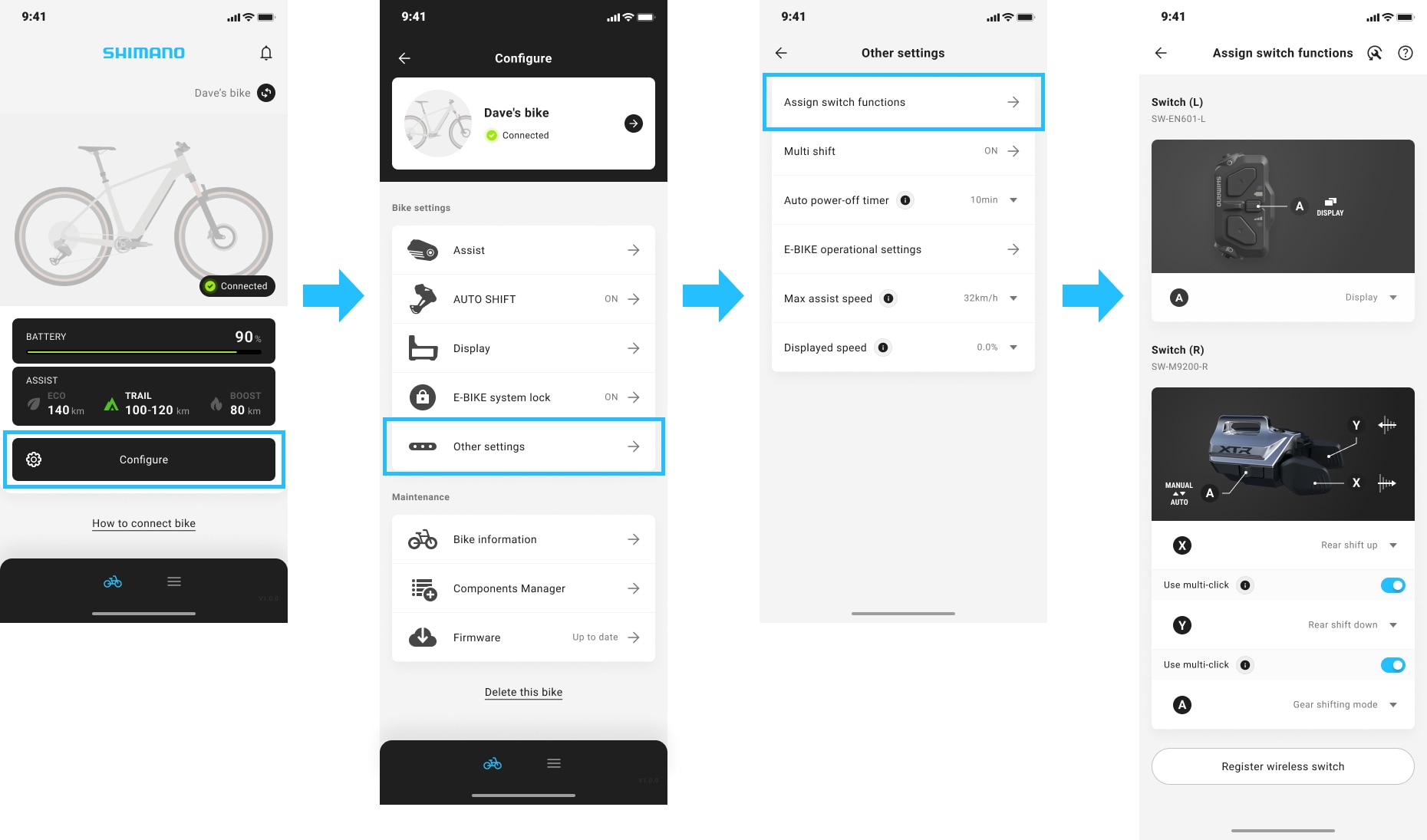
Yes. Go to "Configure" > "Other settings" > "Assign switch functions" to change the assigned functions.
What is FRONT SHIFT NEXT? (N-7000)
"FRONT SHIFT NEXT" is a function that allows you to shift the chainring with a single button. Pressing the button shifts to the next chainring based on the current chainring position.
- When the chainring is small → Shifts to the larger chainring
- When the chainring is large → Shifts to the smaller chainring
To use this function, assign "FRONT SHIFT NEXT" to a button on the shifter/switch.
How do I reset the traveling distance stored in the SHIMANO E-BIKE SYSTEMS. (SC-1450)
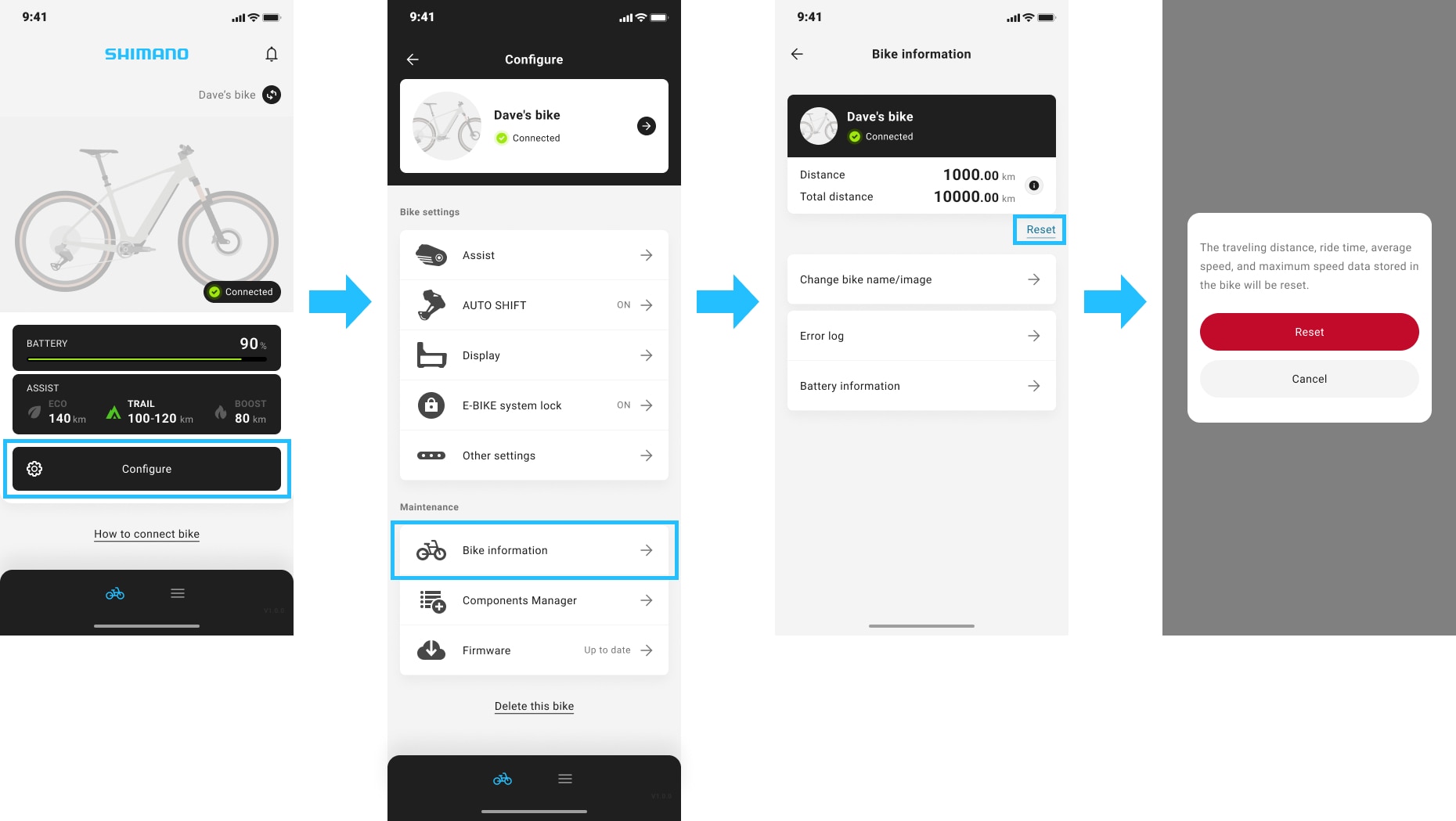
Select "Configure" > "Bike Information" under Maintenance, then tap "Reset".
The traveling distance, ride time, average speed, and maximum speed data stored in the bike will be reset.
How do I adjust the multi-shift operation when holding down the shifter? (SC-1460)
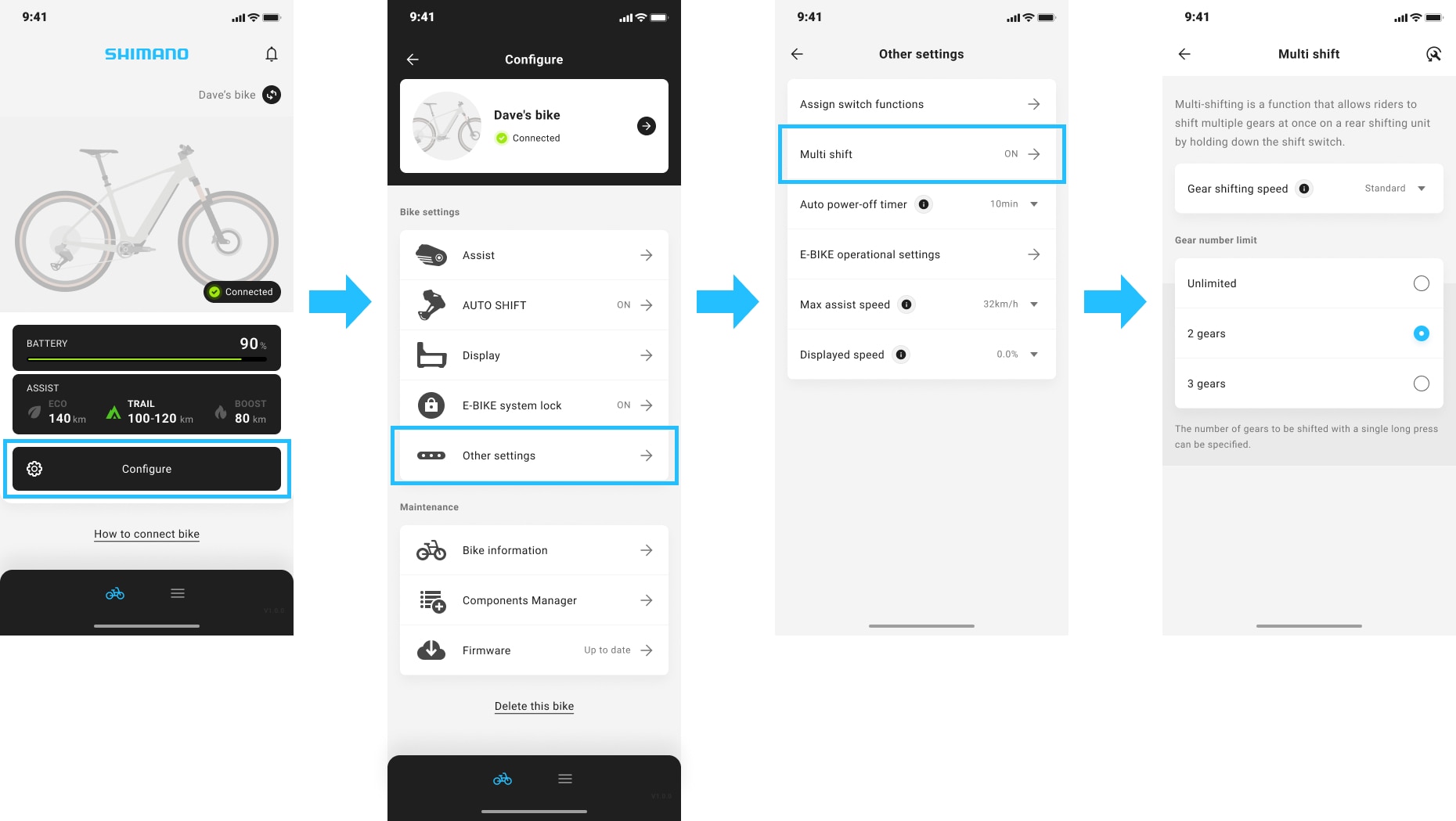
Go to "Configure" > "Other settings" > "Multi shift" to configure the multi-shift settings.
How do I check the information on SHIMANO E-BIKE SYSTEMS batteries? (SC-1470)
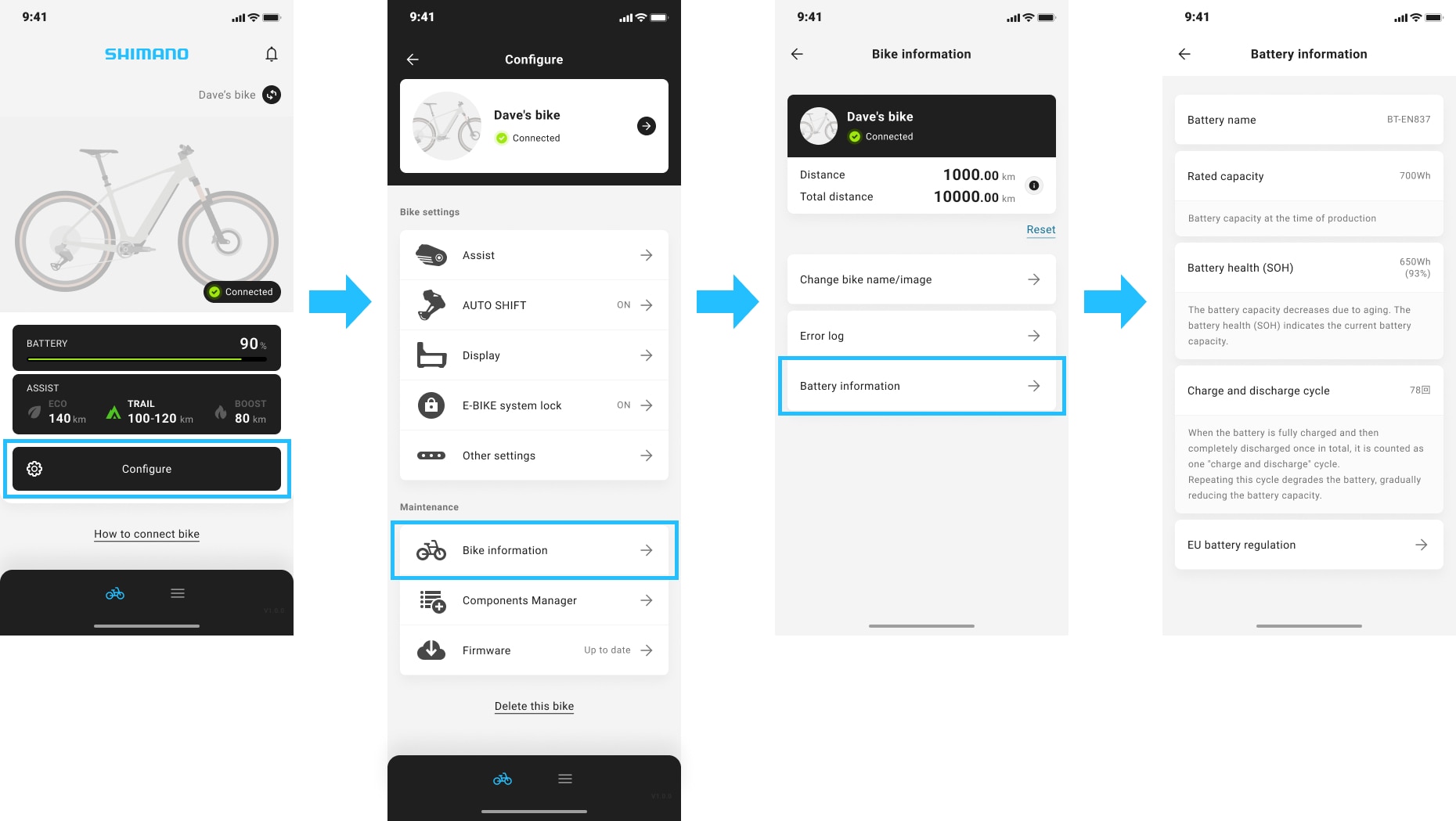
Go to "Configure" > "Bike information" under Maintenance > "Battery information" to view the battery information.
I want to use AUTO SHIFT, but I do not know how to set it up. (SC-1480)
To use AUTO SHIFT, you need a bike equipped with a Di2 rear derailleur or a motor unit that can be connected via wire to SHIMANO E-BIKE SYSTEMS.
- If the configuration supports AUTO SHIFT, "AUTO SHIFT" appears on the "Configure" screen.
When "Selected gear shifting mode" is set to "Auto", gear shifting occurs automatically based on your riding conditions.
How do I register a wireless switch? (SC-1490)
Go to "Configure" > "Manage components" under Maintenance > "Register or delete wireless switch" to register a wireless switch. Follow the instructions on the screen to register.
What can be adjusted in the assist settings of my E-BIKE? (SC-1500)
In the assist settings, you can adjust the upper torque limit or assist level to set the strength of each assist mode.
In addition, Advanced settings allows you to adjust when the assistance starts at the start of the ride as well as how long assistance continues after you stop pedaling. You can also add assist modes you want to use.
Go to "Configure" > "Assist" to configure the assist settings. Tap the "?" mark at the top right of the Assist screen for details.
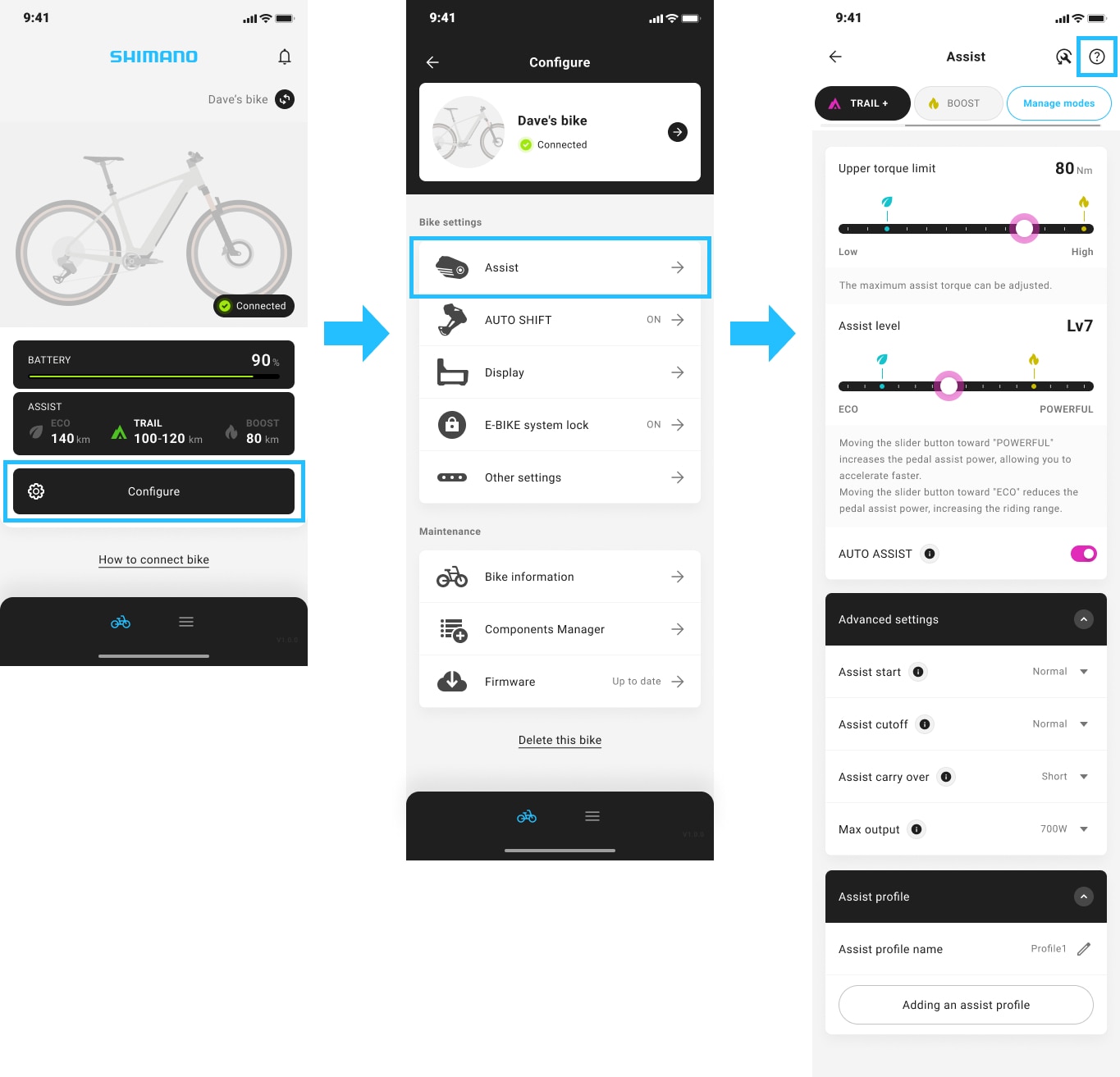
Battery consumption increased after I tapped the "More powerful". How do I restore the previous setting? (SC-1510)
To undo the "More powerful" setting, go to "Configure" > "Assist" and change the setting.
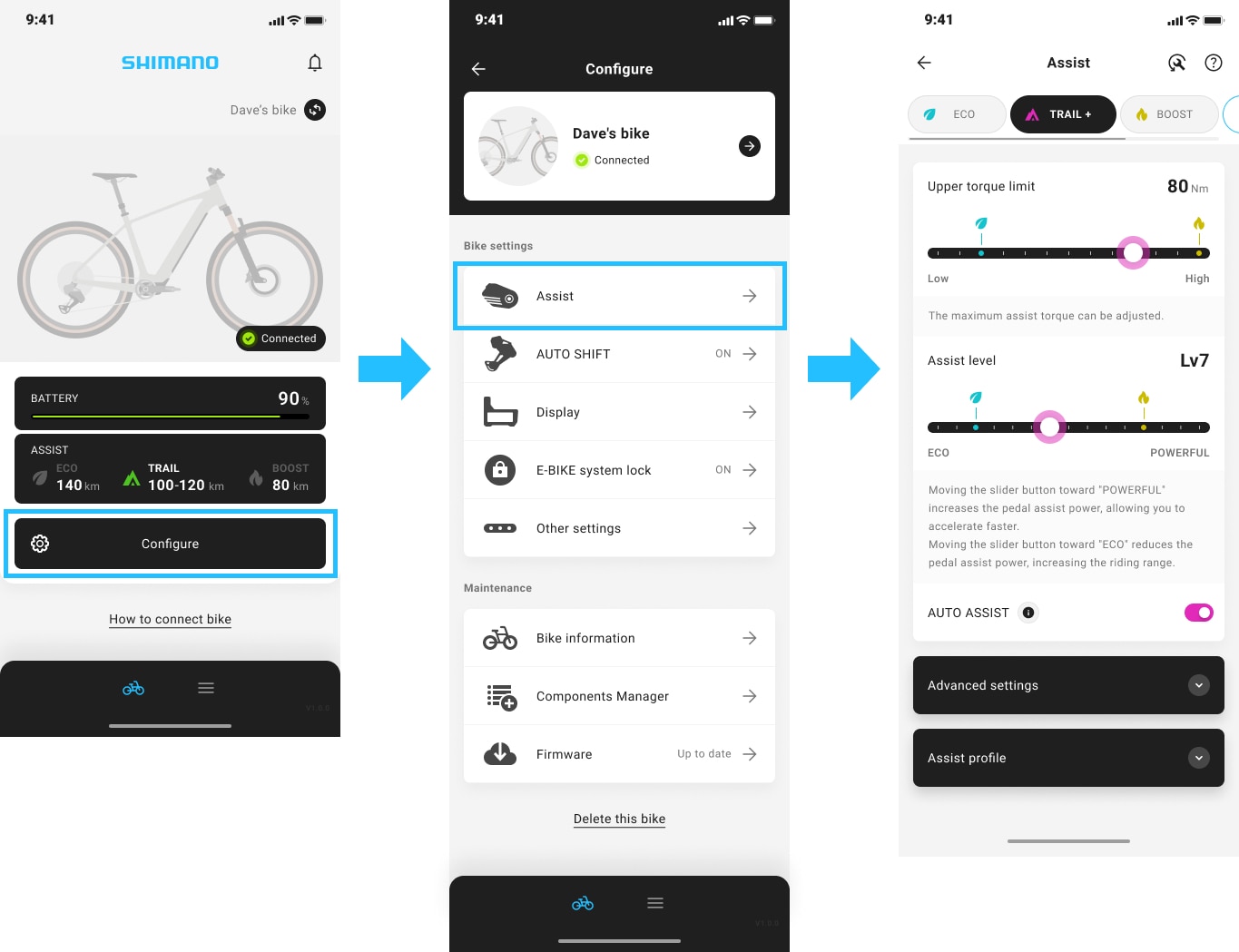
Change the upper torque limit by one notch toward 'Low' and the assist level toward 'ECO' for each mode to undo the "More powerful" setting.
The assist power became weaker after I tapped the "Extend the range". How do I restore the previous setting? (SC-1520)
To undo the "Extend the range" setting, go to "Configure" > "Assist" and change the assist setting.
Change the upper torque limit by one notch toward "High" and the assist level toward "POWERFUL" for each mode to undo the "Extend the range" setting.
How can I customize the E-BIKE display? (SC-1530)
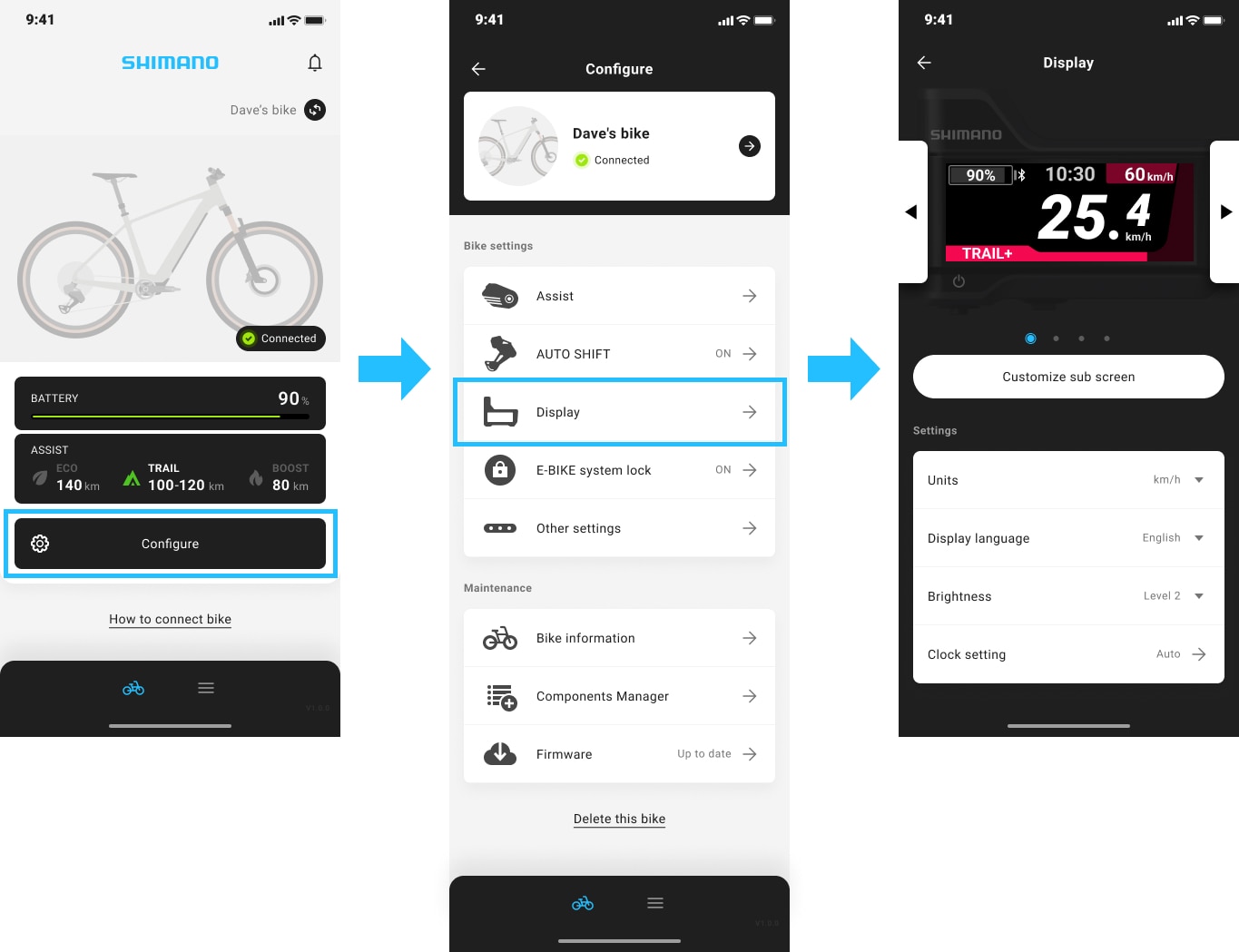
The following settings can be configured on the E-BIKE display:
- Items displayed on sub-screens (from the second screen onwards)
- Units (km/mile)
- Brightness
- Clock setting (automatic/manual)
Go to "Configure" > "Display" to configure the display settings.
How do I set up the E-BIKE system lock? (SC-1540)
Go to "Set up E-BIKE system lock" on the home screen and enable the E-BIKE system lock, then set up the unlock method.
If "Set up E-BIKE system lock" does not appear on the home screen, go to "Configure" > "E-BIKE system lock" to set up the E-BIKE system lock.
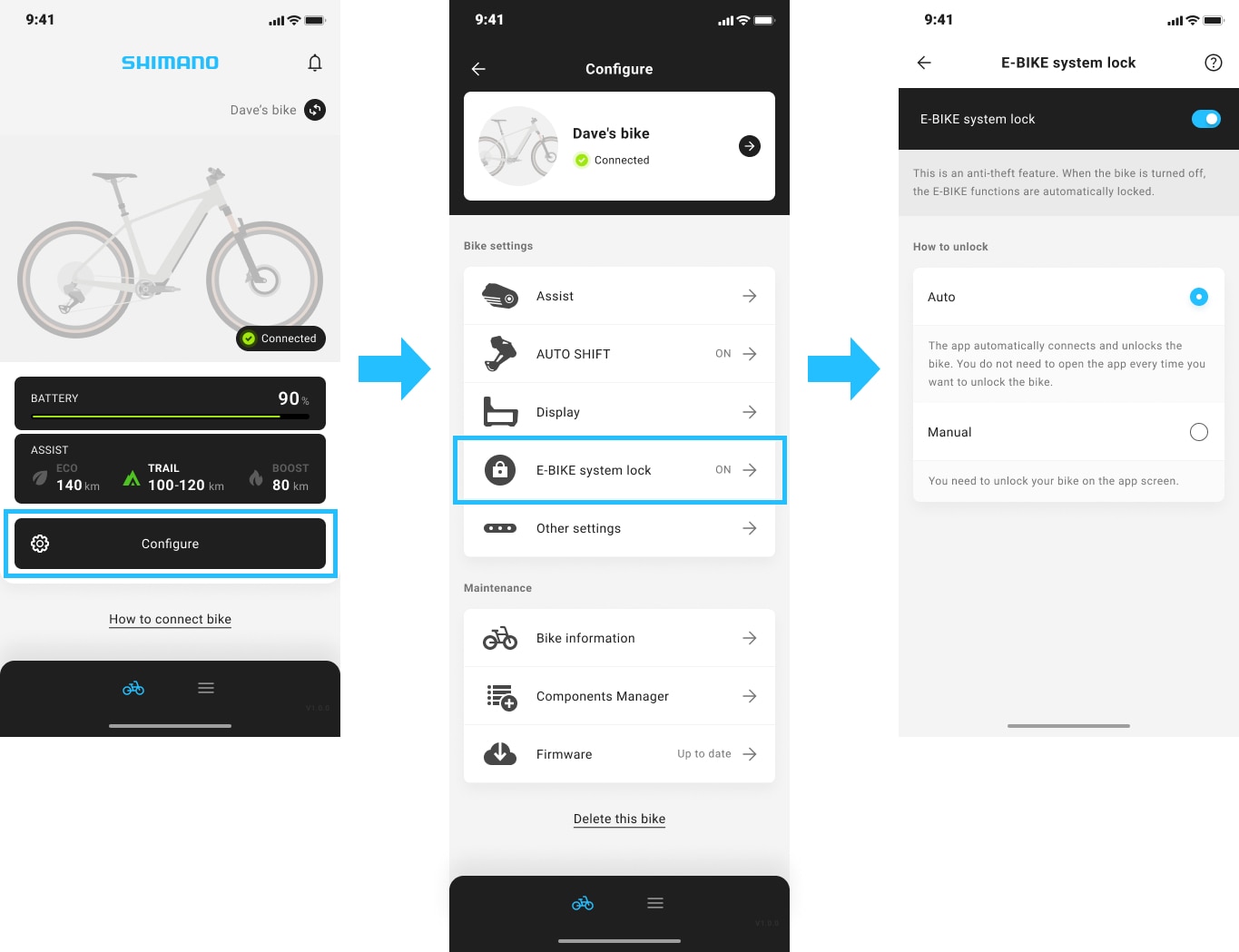
There are 2 ways of unlocking; "Auto" and "Manual".
- "Auto": The bike unlocks automatically once the smartphone and bike are connected.
- "Manual": Use your smartphone to unlock the bike.
Check the help section on the SHIMANO CONNECT E-BIKE system lock screen for details.
Once set up, the bike locks automatically when turned off. Always take your smartphone with you when using your E-BIKE as you need it to unlock the bike.
If unlocking fails, see below:
Where can I view the product names and serial numbers of the connected bike components? (SC-1550)
Go to "Configure" > "Manage components" under Maintenance to view component names and serial numbers.
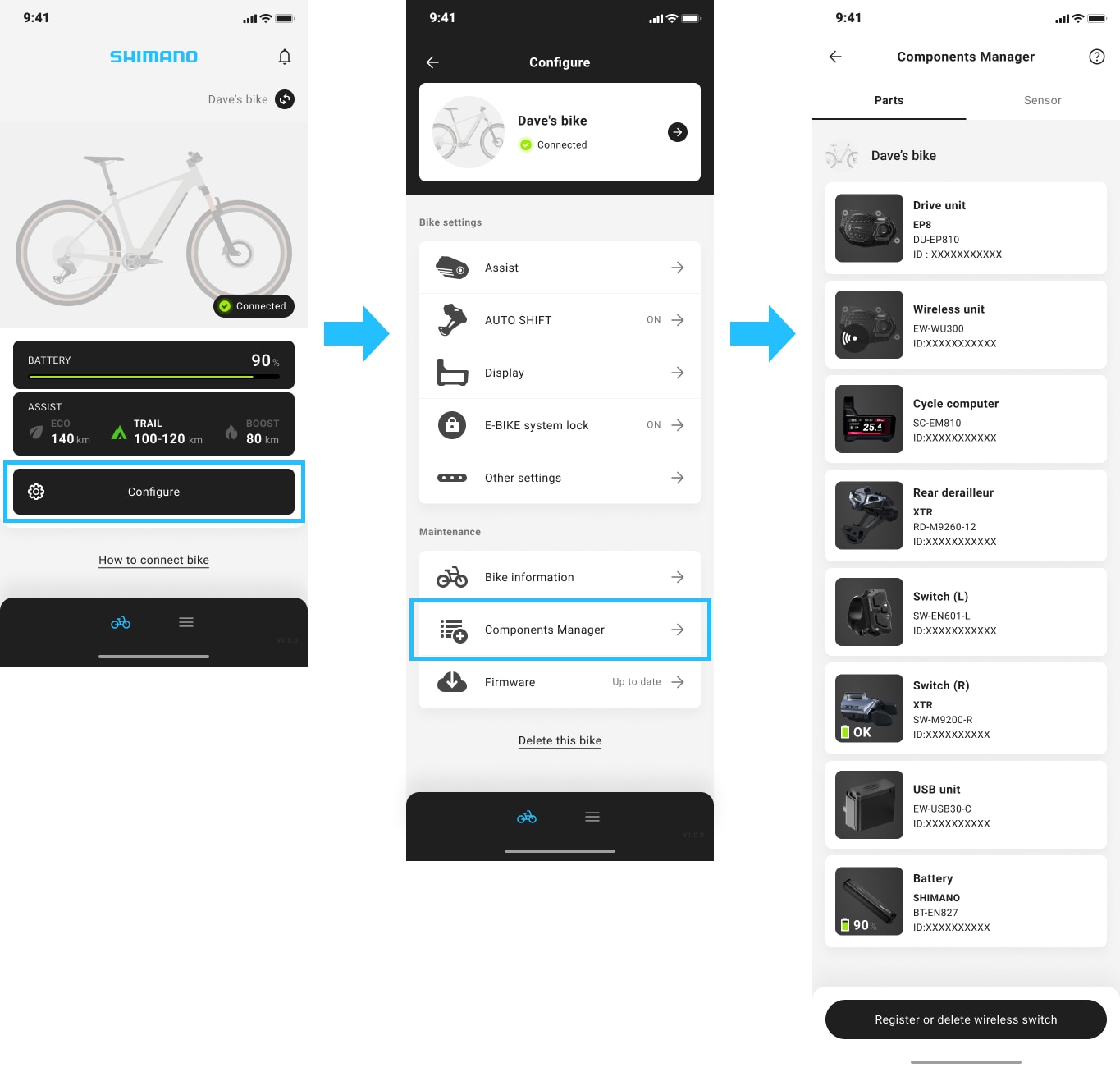
Visit the official SHIMANO website for detailed part information.
See below for information on SHIMANO E-BIKE SYSTEMS batteries.
> How do I check the information on SHIMANO E-BIKE SYSTEMS batteries?
SHIMANO CONNECT
Troubleshooting
SHIMANO CONNECT won't open. (SC-1560)
Please update the app to the latest version and try again.
If it still does not open correctly after updating to the latest version, check the following:
- Beta versions of operating systems are not supported. Please use an official version.
- If you have security software installed, check if this app is being blocked. If so, unblock it.
- Your smartphone may be running low on memory. Close any unused apps and restart your device.
- If you are using an Android device, go to "Settings" > "Apps" on your smartphone and clear the data and cache. After clearing them, go to "Settings" > "Apps" and select "Force stop" for this app, then restart your device.
I cannot connect to my bike. (SC-1570)
To connect to your bike for the first time, open SHIMANO CONNECT and follow the instructions on the screen. Tap here for details on how to connect to a bike.
If your bike does not appear in SHIMANO CONNECT while pairing, see below:
> I cannot pair my bike with SHIMANO CONNECT.
If you cannot connect SHIMANO CONNECT to a registered bike, see below:
> I cannot connect to a bike registered in SHIMANO CONNECT.
SHIMANO CONNECT keeps crashing. (SC-1580)
SHIMANO CONNECT may crash if your smartphone runs low on memory.
If your smartphone is running low on memory, close any unused apps or clear the cache.
Also, if the app fails to open, see below:
What should I do when I encounter a malfunction such as SHIMANO CONNECT not moving to the next page or freezing while loading? (SC-1600)
The app may not function properly if the internet connection or the connection to the bike is unstable. Check the connection status and use the app near the bike.
If the issue persists, force closing the app and reopening it may restore normal operation.
The procedure for force closing smartphone apps, including those running in the background, is shown below:
<How to close apps>
[iOS version] Tap here for details
[Android version] Tap here for details
If the app does not open, see below:
I cannot download SHIMANO CONNECT. (SC-1610)
SHIMANO CONNECT can only be downloaded and used on supported operating systems.
I cannot unlock the E-BIKE system lock. (SC-1630)
If you cannot unlock the E-BIKE system lock that you set up, turn the bike on and follow the steps below:
*If you have set up the E-BIKE system lock using a 3rd party product, consult your place of purchase.
1. Log in to SHIMANO CONNECT and unlock your bike
Log in to SHIMANO CONNECT, connect to your bike, and check if you can unlock your bike.
If you have forgotten your password and cannot log in, enter your email address and then tap "Forgot password?" to reset your password.
If you still cannot unlock your bike after logging in, check if you have logged in with a different SHIMANO ID. If you are logged in to the correct account, you can view your bike's information on the home screen or in the Bike list.
2. If you cannot use the smartphone you used to enable the lock:
To unlock your bike, log in to SHIMANO CONNECT on a different smartphone and connect to the bike.
3. If the methods above do not resolve the issue:
If none of the methods above resolve the issue, contact your place of purchase or a distributor.
See below for information on how to unlock your bike set up by a 3rd party.
The wireless shifter/switch does not respond. (SC-1640)
If the wireless switch/shifter does not respond, check the following items in order:
- Check the battery level of the wireless switch/shifter. If the battery level is low, replace the button battery with a new one.
- Go to "Configure" > "Manage components" to check if the registered wireless switch/shifter is displayed.
If it is not displayed, the wireless switch/shifter may not be registered correctly. Go to "Register or delete wireless switch" at the bottom of the "Manage components" screen to register.
If the issue persists, contact your place of purchase or a distributor.
I cannot register my wireless switch with SHIMANO CONNECT. (SC-1010)
If the wireless switch cannot be registered, check the following items in order:
1. Does the button battery in the wireless switch have sufficient power?
Press both shift buttons simultaneously for half a second to check the remaining battery level on the LED indicator.
If the LED turns green, the battery has sufficient power. If the LED turns red or does not light up, the battery level is low. Replace the button battery with a new one.
2. Is the switch compatible with the bike?
Check the SHIMANO E-BIKE SYSTEMS compatibility table to see if the switch can be installed on the bike.
3. Did you operate the switch as instructed in SHIMANO CONNECT?
Follow the instructions on the "Register or delete wireless switch" screen and press and hold both main buttons (X/Y) at the same time. This allows SHIMANO CONNECT to detect the wireless switch.
If the issue persists after checking the above, contact your place of purchase or a distributor.
Can I lend my bike to my family or friends if the E-BIKE system lock is enabled? (SC-1650)
No, you cannot lend your bike if the E-BIKE system lock is enabled.
Only the user who registered the bike can disable the E-BIKE system lock. Therefore, the person borrowing the bike would not be able to disable the lock or use the bike.
If you wish to lend the bike to your family or friends, disable the E-BIKE system lock beforehand.
What should I do if the FAQ above does not resolve the issue? (R-5290)
Try the following steps one by one. After performing each step, check if the issue has been resolved.
- Turn off your smartphone's Bluetooth® LE function and then back on again.
- Force close the app and open it again.
- Turn off your bike and then back on.
- Turn off your smartphone and then back on.
The procedure for force closing smartphone apps, including those running in the background, is shown below:
<How to close apps>
[iOS version] Tap here for details
[Android version] Tap here for details
If the issue persists after trying the above steps, contact your place of purchase or a distributor.
SHIMANO CONNECT
Others
What smartphone settings are required to use SHIMANO CONNECT? (SC-1660)
To use SHIMANO CONNECT, turn on Bluetooth and grant nearby devices permission.
On Android, location permission may be required to use Bluetooth.
To upload your bike image, allow storage and camera access.
To use the notification feature, allow notifications.
How do I turn off app notifications? (SC-1670)
Go to "Account/settings" > "Notifications" to set up push notifications.
If you turn off notifications, push notifications will no longer be displayed. However, you can still view notification details in the SHIMANO CONNECT app.



